


Summary
The Rust Oxide permission system allows server owners to control plugin access and player permissions. In this guide, you will learn how the Rust Oxide permission system works and how to configure it properly.
Rust oxide permission system
Oxide allows you to add various plugins to your server which can alter gameplay through various commands or functionalities. Many of these features have associated permissions, allowing you to control who has access to each of them.
In short, permissions are simply a string or sequence of letters and digits, commonly separated into sections using periods. These sections are referred to as “permission nodes” or “nodes” for short.
Our example plugin features a few different permissions, for instance enhancedbansystem.banlist. When a user has this permission, it allows them to use the command /banlist
Wildcards: A wildcard acts as a “grant all” for a node, and is commonly denoted by the asterisk symbol. For example, the permission enhancedbansystem.* will grant the user all permissions from our example plugin.
Groups
Occasionally you may want to assign the same set of permissions to multiple people. For instance, you may want admins on your server to have access to commands such as banning and kicking. Instead of assigning each user the same permissions, Oxide features the group system.
Oxide’s permission groups offer the following features:
- Create multiple groups with any names.
- Quickly add and remove permissions to a group.
- Add and remove users from a group. Users inherit permissions from their groups.
- Create group hierarchies with inheritance.
Inheritance
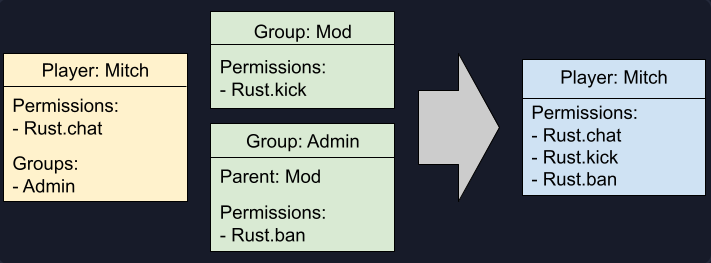
When a user is assigned a group, they are not directly given the permissions, rather they inherit the permissions from the group. When called upon, the permission system will first check if the player has the permission, if not it will check if their groups do.
Similarly, you may assign groups a “parent” group. The “child” group will then inherit all permissions the parent has.
Below is an example of how the player Mitch inherits permissions from the Admin group, which inherits from the Mod group.
Rust oxide permission commands
Command |
Description |
|---|---|
Oxide.grant user "STEAMID64" "permission"
|
Grants a permission to an individual player.
|
Oxide.revoke user "STEAMID64" "permission"
|
Revokes a permission from an individual player.
|
Group Commands
Command |
Description |
|---|---|
Oxide.group add "group-name" "[Title]” "rank"
|
Creates a new group with the specified group-name. The title and rank are optional, but if provided sets those two values.
|
Oxide.group set "group-name" "[Title]” "rank"
|
Sets the title of the group. The rank is optional, but if provided sets the rank of the group.
|
Oxide.group remove "group-name"
|
Deletes the group.
|
Oxide.grant group "group-name" "permission"
|
Grants a permission to a group.
|
Oxide.revoke group "group-name" "permission"
|
Revokes a permission from a group.
|
Oxide.group parent "group-name" "parent group-name"
|
Set a parent for a group, the group will inherit all permissions from the parent.
|
Oxide.usergroup add "STEAMID64" "group-name"
|
Adds a user to a group.
|
Oxide.usergroup remove "STEAMID64" "group-name"
|
Removes a user from a group.
|
Information commands
Command |
Description |
|---|---|
Oxide.show user "STEAMID64"
|
Shows the permissions a user has
|
Oxide.show group "group-name"
|
Shows data for a specific group. Includes permissions, parents, title, rank, and members.
|
Oxide.show perm "permission"
|
Shows which users or groups have this permission.
|
Oxide.show groups
|
Shows a list of all groups.
|
Oxide.show perms
|
Show all registered permissions from all plugins and Oxide.
|
Timed Permissions Plugin
Allows you to grant permissions or groups for a specific time
Command |
Description |
|---|---|
revokeperm "player|steamid" "permission"
|
Revoke a timed permission from a player
|
grantperm "player|steamid" "permission" "time"
|
Give a player a permission for a specific time
|
removegroup "player|steamid" "group"
|
Remove a timed group from a player
|
addgroup "player|steamid" "group" "time"
|
Add a player to a group for a specific time
|
pinfo [player|steamid]
|
Show active timed permissions and groups of a player
|
Usage example: /grantperm GT timedpermissions.use 30d
gives GT the permission timedpermissions.use for 30 days.
- d = days
- h = hours
- m = minutes
Need help setting up your Rust server?
Rust Modding offers professional Rust server setup, custom plugins, and full configuration services. If you want a stable and unique Rust server, explore our services here.