
Summary
How to change the header image on server ? Changing the header image on a Rust server can help refresh its appearance and make it more visually appealing to new and existing players.
A custom header image can help to differentiate the server from other servers in the browser and search results, making it easier for players to recognize and remember the server.
Additionally, it can help to establish the server’s theme and create a sense of immersion for the players.
NOTE: The server header image size must be 512×256 or 1024×512.
- 1. Upload the server image on Dropbox.
- 2. Copy the link for the image.
- 3. Stop the Server.
- 4. Go to the Startup tab.
- 5. In the Server Image box, paste the link from Step 2.
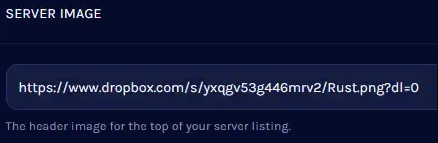
- 6. Change the Drop Box link at the end to dl=1.
- 7. Start the server.
Need help setting up your Rust server?
Rust Modding offers professional Rust server setup, custom plugins, and full configuration services. If you want a stable and unique Rust server, explore our services here.
