

Summary
Adding and removing admins on a Rust server can play a role in maintaining a safe and enjoyable gameplay experience for all players. Admins can monitor and enforce the server’s rules, respond to player complaints, and prevent or stop disruptive behavior. On the other hand, removing admins who abuse their power or fail to fulfill their responsibilities is equally essential to ensure a fair and safe gameplay experience.
NOTE: There are two different admin roles, ownerid and moderatorid. OwnerID allows the person with this role to add and delete admins; moderatorID does not.
- 1. Go to your server control panel.
- 2. Go to the server console.
- 3. Enter the following line and replace the text with the desired ID and optional text for each admin:
ownerid SteamID64 “optional_user_name” “optional_reason”
or
moderatorid SteamID64 “optional_name” “optional_reason”
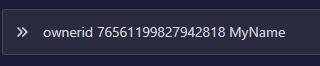
NOTE: Learn how to find SteamID64 here.
If you were on the server at the moment of entering the commands, you need to rejoin it.
Need help setting up your Rust server?
Rust Modding offers professional Rust server setup, custom plugins, and full configuration services. If you want a stable and unique Rust server, explore our services here.
